# Reading the graph

> What the console's graph draws. A node's colour, shape and size, the holder and age under its title, and the four strokes an edge can have.

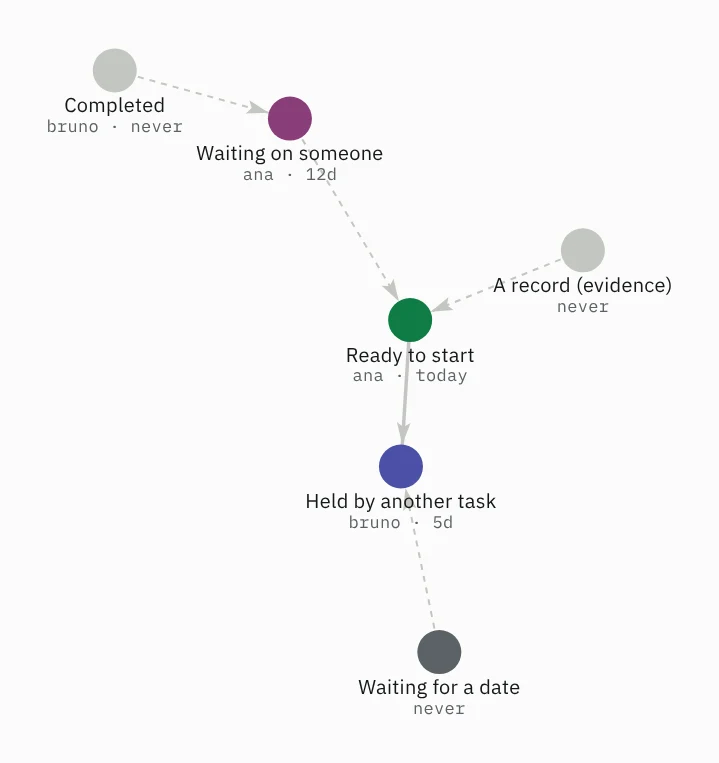
The console at [/app](https://flow.ttoss.dev/app) opens on a graph of the tasks you can reach. Each visual channel answers one question. Colour is readiness, shape is kind, size is priority, and an edge's stroke is its kind. Learn those four and the picture reads itself.

## Colour is readiness

<figure class="shot">
  <img class="shot__light" src="/docs/graph/colors-light.webp" width="553" height="587" alt="Six tasks: a green one ready to start, an indigo one held by it, a magenta one waiting on someone, a dark grey one waiting for a date, and two pale grey ones, a completed task and an evidence record.">
  <img class="shot__dark" src="/docs/graph/colors-dark.webp" width="553" height="587" alt="">
</figure>

A node's hue is its [readiness](https://flow.ttoss.dev/docs/vocabulary.md#readiness), which Flow computes from the edges and waits on every read. It is not the status somebody wrote. Nothing else in the graph carries a colour.

<div class="table-scroll">
<table class="legend">
<thead><tr><th>Colour</th><th>Light · dark</th><th>Readiness</th><th>What it means</th></tr></thead>
<tbody>
<tr><td>Green</td><td class="swatches"><span class="swatch theme-light" role="img" aria-label="on the light theme"><span class="swatch__dot swatch__dot--ready"></span></span><span class="swatch theme-dark" role="img" aria-label="on the dark theme"><span class="swatch__dot swatch__dot--ready"></span></span></td><td><code>ready</code></td><td>Nothing holds it. You can start it now</td></tr>
<tr><td>Indigo</td><td class="swatches"><span class="swatch theme-light" role="img" aria-label="on the light theme"><span class="swatch__dot swatch__dot--blocked-dependency"></span></span><span class="swatch theme-dark" role="img" aria-label="on the dark theme"><span class="swatch__dot swatch__dot--blocked-dependency"></span></span></td><td><code>blocked:dependency</code></td><td>An open task <code>blocks</code> it. Finishing that task clears it</td></tr>
<tr><td>Magenta</td><td class="swatches"><span class="swatch theme-light" role="img" aria-label="on the light theme"><span class="swatch__dot swatch__dot--blocked-external"></span></span><span class="swatch theme-dark" role="img" aria-label="on the dark theme"><span class="swatch__dot swatch__dot--blocked-external"></span></span></td><td><code>blocked:external</code></td><td>Someone or something outside the graph holds it. Chase them</td></tr>
<tr><td>Dark grey</td><td class="swatches"><span class="swatch theme-light" role="img" aria-label="on the light theme"><span class="swatch__dot swatch__dot--waiting-scheduled"></span></span><span class="swatch theme-dark" role="img" aria-label="on the dark theme"><span class="swatch__dot swatch__dot--waiting-scheduled"></span></span></td><td><code>waiting:scheduled</code></td><td>A date holds it, and the date clears it. Grey because nobody has anything to do yet</td></tr>
<tr><td>Pale grey</td><td class="swatches"><span class="swatch theme-light" role="img" aria-label="on the light theme"><span class="swatch__dot swatch__dot--none"></span></span><span class="swatch theme-dark" role="img" aria-label="on the dark theme"><span class="swatch__dot swatch__dot--none"></span></span></td><td>none</td><td>A closed task or a record (evidence). There is nothing to start</td></tr>
</tbody>
</table>
</div>

A green milestone means everything that blocked it is done, so the milestone is reached and can be closed.

A status and a colour that disagree are drift. For example, a task still `waiting` that has turned green, or one `active` that is indigo. A [review](https://flow.ttoss.dev/docs/method/review.md#drift) finds both.

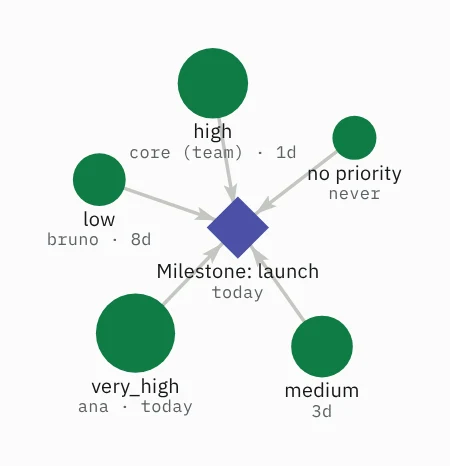
## Shape is kind, size is priority

<figure class="shot">
  <img class="shot__light" src="/docs/graph/shapes-light.webp" width="346" height="358" alt="An indigo diamond, a milestone, with five green circles blocking it. The circles grow from no priority, the smallest, to very_high, the largest.">
  <img class="shot__dark" src="/docs/graph/shapes-dark.webp" width="346" height="358" alt="">
</figure>

A diamond is a [`project`](https://flow.ttoss.dev/docs/vocabulary.md#record-kinds), a milestone. Other tasks `block` into it and it carries no work of its own, so it is the one node never to pick up. Every other kind is a circle.

Size is the [priority](https://flow.ttoss.dev/docs/vocabulary.md#priorities) somebody asserted. A task with no priority is drawn at the base size, the same as `very_low`, because nobody said it matters. `very_high` is the largest. The milestone above is indigo because five open tasks still block it.

## The line under the title

The second line says who holds the task, then how fresh its evidence is: "ana · 5d". The holder is the person or team the task is assigned to, and "you" when it is you. A task nobody holds shows the age alone, so it reads as free to take. The age is the oldest verification among the task's references: "today", or the days since, such as "5d". "never" means at least one reference was never verified, or the task has no reference at all. Flow never checks a source itself, so this is how old the last look was. A long holder name is cut and the age never is. Hover a node for both in full. See [references](https://flow.ttoss.dev/docs/start/concepts.md#what-flow-keeps).

## An edge's stroke is its kind

<figure class="shot">
  <img class="shot__light" src="/docs/graph/edges-light.webp" width="387" height="645" alt="A solid line from Schema migration to Backfill, a dotted line from Backfill to Release, short dashes from New plan to Schema migration and from Load test results to Backfill, and long dashes from New plan to Old plan.">
  <img class="shot__dark" src="/docs/graph/edges-dark.webp" width="387" height="645" alt="">
</figure>

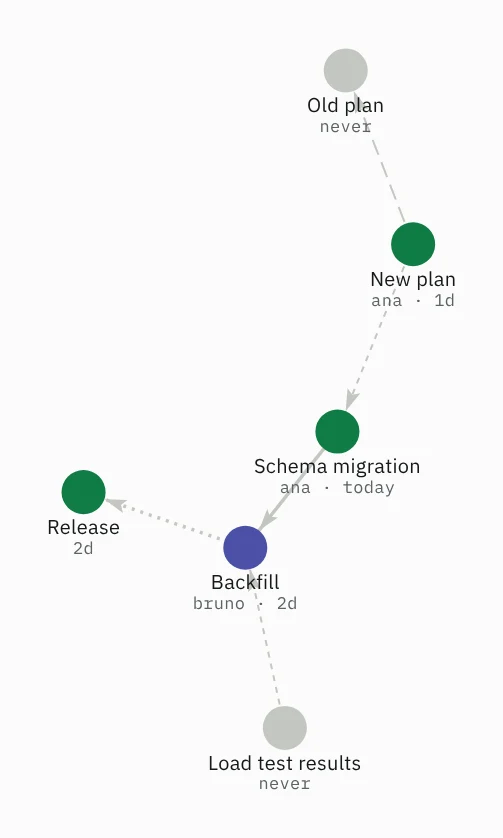
Edges carry no colour. Weight says whether the edge gates readiness, and the dash says what kind of relation it is. Every [link kind](https://flow.ttoss.dev/docs/vocabulary.md#link-kinds) is drawn, with its arrow pointing from `from` to `to`.

| Stroke                 | Edge                                                               | In the picture              |
| ---------------------- | ------------------------------------------------------------------ | --------------------------- |
| Heavy, solid           | `blocks`, the one kind that holds work up                          | Schema migration → Backfill |
| Heavy, dotted          | A `blocks` chain through tasks the filter hides                    | Backfill → Release          |
| Hairline, long dashes  | `supersedes` and `retracts`: the far end is no longer the live one | New plan → Old plan         |
| Hairline, short dashes | Every other kind: context, not work                                | New plan → Schema migration |

The dotted line stands in for steps you cannot see. Above, Backfill blocks a completed step, which blocks Release. The graph opens on commitments only (`active`, `waiting`, `calendar` and `blocked`; incubated ideas and reference material are one filter away), so the completed step is hidden and the chain is drawn dotted between the two ends left on screen. Release is green because a completed task holds nothing.

## Nearness is derived

Tasks also drift towards each other with no line between them, when they cite the same page or sit in the same project. That pull is weaker than any edge and never drawn. A line is the one thing in the picture that says somebody asserted a relation, and two nodes that are merely close have asserted nothing.